
How to organize Suno songs, prompts and versions
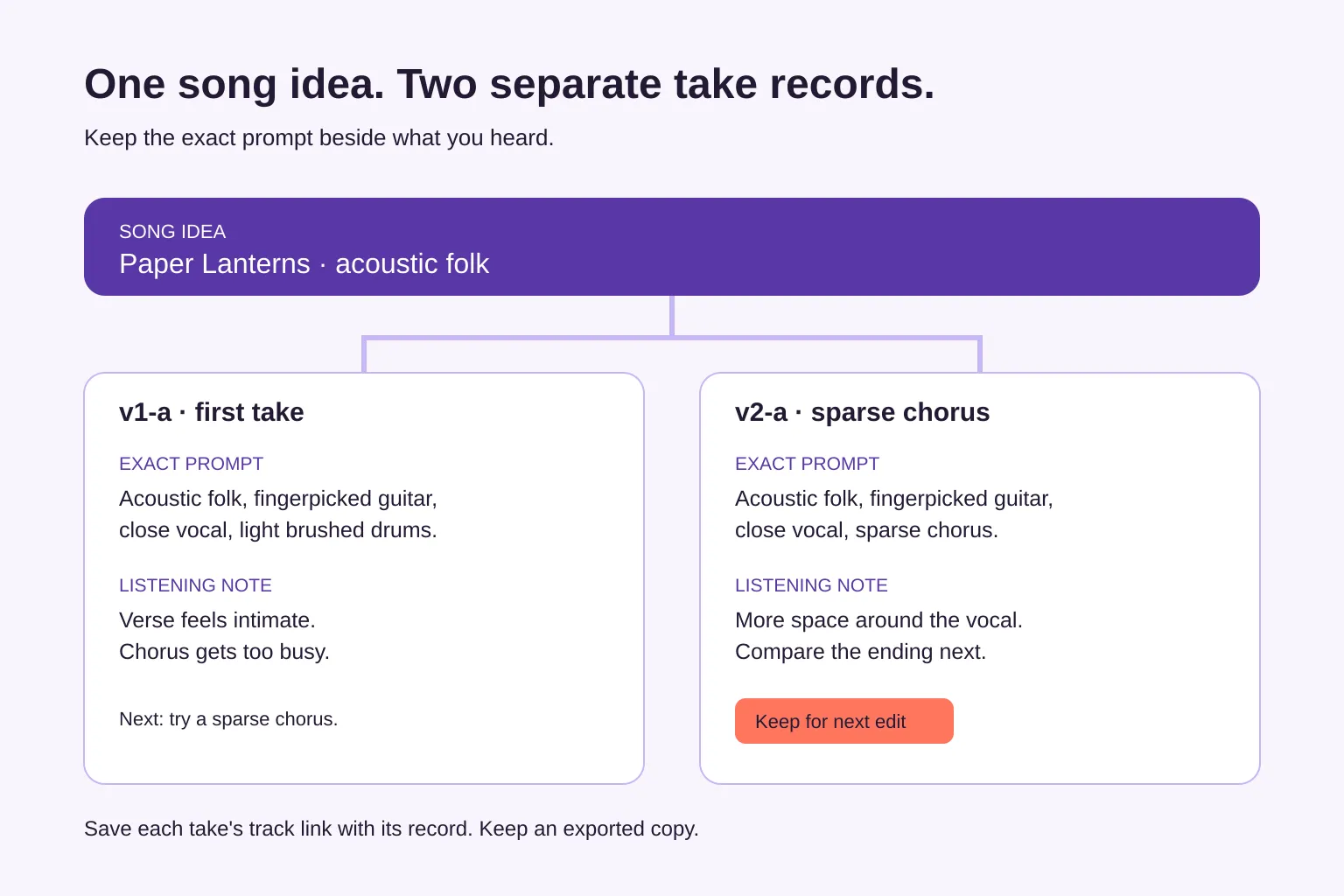
To organize Suno songs, group related tracks together and keep a separate record for each take you might develop. Save its exact prompt, track link, version label and a short listening note. Start with your keepers, then export a copy of the records so you can find both the sound and the reason you kept it.
How to organize Suno songs without sorting everything
Start with the song you're most likely to work on next. Gather its promising takes and put the rest of your library aside for now. A small, useful collection is easier to maintain than a catalogue you have to finish before making music again.
Use Suno's own grouping tools for the tracks. Suno's Workspace help describes grouping creations and edits in Workspaces, including moving selected songs from the Library. Give the group a stable song-idea name, such as “Paper Lanterns,” rather than a verdict like “best songs.”
Keep a companion record when you need to remember why a take matters. That record can live in a spreadsheet or a notes tool; the important part is linking the exact instruction to the resulting track.
Keep one record per take
A take is an individual audio result you can listen to and choose between. Two results from the same prompt can share the prompt text, but they need separate records if you want to compare or develop both.
Use these fields:
- Title: the stable song name, such as
Paper Lanterns. - Version: a unique label, such as
v1-a · first take. - Exact prompt: the full text used for that take, copied rather than summarized.
- Track link: the address of that specific Suno track. If you're working from a downloaded file, also note its filename.
- Listening notes: what worked, what needs attention and the next action.
- Genre: an optional broad label that helps you find related work.
If you supplied lyrics or used additional controls, keep those details in clearly labeled notes as well. Don't expect a style prompt alone to describe every choice behind the result.
Saving the prompt preserves context; it doesn't guarantee that using it again will reproduce the same audio.
Give versions labels you can trace
Pick a convention and stick with it. One workable system is a number for each prompt revision and a letter for each take made from that revision:
v1-aandv1-b: different takes made with the first prompt.v2-a: a take made after revising the prompt.v2-a-edit1: an edit derived from that specific take.
Add a short description after the label: v2-a · sparse chorus tells you more than final-new-2. These are your record labels, so you can use them even if the track title in Suno stays simple.
Keep listening status separate from identity. A note such as Keep for next edit can change tomorrow; the label v2-a should still point to the same take.
Worked example: keep the prompt change and the decision
Say you're making an acoustic-folk song called “Paper Lanterns.” You like the first take's verse, but its chorus feels crowded. Here's how to keep the two results connected without overwriting the first prompt.
First record: v1-a · first take
Exact prompt:
Acoustic folk, fingerpicked guitar, close vocal, light brushed drums.
Listening notes:
Verse feels intimate. Chorus gets too busy. Next: try a sparse chorus while keeping the close vocal.
Add the first take's track link to this record.
Second record: v2-a · sparse chorus
Exact prompt:
Acoustic folk, fingerpicked guitar, close vocal, sparse chorus.
Listening notes:
More space around the vocal. Keep for next edit; compare the ending before choosing the full-song keeper.
Add the second take's own track link. The specific revision was replacing “light brushed drums” with “sparse chorus.” Keep the full second prompt, not just a note saying “less busy.”
You now have a reason to reopen each take. The first has a verse worth revisiting; the second is the next-edit candidate. The listening note describes what you heard, without assuming the prompt change was the only reason the result differed.
Write notes that lead to the next action
A useful listening note names a part of the song and a decision. “Good vibe” doesn't tell you what to do when you return a month later.
Try this format:
Keep: close vocal in the verse. Fix: chorus masks the words. Next: compare a sparser take.
Use timestamps when they help you locate something: “Listen again to the transition at 0:42” is easier to act on than “weird transition.” Separate what you asked for from what you heard. A requested tempo or instrument belongs with the prompt; a listening observation belongs in the notes.
Avoid the three mistakes that lose context
Overwriting an old prompt: changing the prompt in yesterday's record makes it look as though yesterday's audio came from today's instruction. Duplicate the record for a new take, then update the prompt and link.
Using one link for several takes: similar names don't identify the audio. Open each saved link once and check that it plays the intended result.
Treating a record export as an audio backup: a CSV contains text and links, not the music itself. Keep important audio files separately, with filenames that match your version labels.
At the end of a session, record the takes you kept, write the next action and export the updated records. If you already have hundreds of songs, continue backfilling only when you revisit one. You don't need to reconstruct every experiment.
Put your first take into a record
SunoDash's free browser organizer lets you manually save a title, exact prompt, version, genre, notes and Suno link, then search your records and download them as CSV without signup. Add the take you want to develop next; records stay only in that browser on that device and can be lost when browser data is cleared, so download a copy before relying on them.